Showing posts with label monitor. Show all posts
Showing posts with label monitor. Show all posts
Tuesday, December 24, 2013
Treatment LCD monitor
Treatment LCD Monitor. At this time computer use familiar and already widely used either for work or entertainment. And of course when talking about computers it will not be far away with a device called a monitor. And today use CRT monitors have started to decrease with the LCD Monitor that despite having a price that is quite expensive but have many advantages than conventional CRT monitors.
Here are a few advantages of LCD monitor is a stylish design, flat screen and a brighter color than convex or crt monitor screen, while also LCD Monitors have many advantages among which have a high resolution so that it can help many people especially those working Visual design field.
There are some special treatment for LCD monitors in this case is for the treatment of LCD monitors, the following are some steps steps:
Use the LCD as needed, Do not use if you do not need so-necessary and do not use it 24 hours nonstop jedanya have no time for any electronic item there during his lifetime (Lifetime). Turn off your LCD monitor when your computer dies, in order to save electricity and also keeps your LCD monitor remain durable.
Use the type that has a grounding electrical power, because it can minimize the damage in the event of lightning strikes. This option is optional.
Perform regular cleaning, at least 2 weeks 1 times, for LCD monitors are always in a state clear of dust and other debris. Remember! to clean it must use a very soft cloth that has spread with a special liquid cleaners LCD monitor. If necessary you can buy special equipment to clean the LCD monitor.
Do not engage in cleanup activities in the state of electricity is still flowing, unplug all cables available on the LCD to avoid things that are not desired. The existence of water coming into the series of LCD monitors will be able to cause fatal damage.
Keep the LCD of the things that contain water such as rain water, drinking water etc.. Because all electronic goods electrical short circuit will occur if water enters into the electronic components.
Keep the LCD of goods containing such magnetic sound system, Persani, HP etc. signals. Because it will be fatal is going to happen Noise or damage which may destroy the layout on the monitor screen.
LCD Save a strategic place and safe from the reach of small children, so that you can not avoid tersenggol LCD or a small toy.
Unplug all cables associated with the computer (including LCD) in the event of rain accompanied by lightning, because lightning can be grabbed via the antenna propagate through the cable TV and electricity.
To protect the screen / LCD screen can use the Screen Protector function prevents dust entry into the LCD and also take care of all sorts of scrapes. Remember to choose the screen protector is not a trace when reopened.
If there is damage to your LCD monitors, LCD submit to the experts. Do not disassemble itself without accompanied by experts in the field of electronics. Module Components including LCD monitors that can be easily damaged. LCD Monitor Service you to the service center to ensure the improvement is good and right.
Good article on the LCD monitor is beneficial treatment.

Monday, December 16, 2013
Treatment LCD monitor
Treatment LCD Monitor. At this time computer use familiar and already widely used either for work or entertainment. And of course when talking about computers it will not be far away with a device called a monitor. And today use CRT monitors have started to decrease with the LCD Monitor that despite having a price that is quite expensive but have many advantages than conventional CRT monitors.
Here are a few advantages of LCD monitor is a stylish design, flat screen and a brighter color than convex or crt monitor screen, while also LCD Monitors have many advantages among which have a high resolution so that it can help many people especially those working Visual design field.
There are some special treatment for LCD monitors in this case is for the treatment of LCD monitors, the following are some steps steps:
Use the LCD as needed, Do not use if you do not need so-necessary and do not use it 24 hours nonstop jedanya have no time for any electronic item there during his lifetime (Lifetime). Turn off your LCD monitor when your computer dies, in order to save electricity and also keeps your LCD monitor remain durable.
Use the type that has a grounding electrical power, because it can minimize the damage in the event of lightning strikes. This option is optional.
Perform regular cleaning, at least 2 weeks 1 times, for LCD monitors are always in a state clear of dust and other debris. Remember! to clean it must use a very soft cloth that has spread with a special liquid cleaners LCD monitor. If necessary you can buy special equipment to clean the LCD monitor.
Do not engage in cleanup activities in the state of electricity is still flowing, unplug all cables available on the LCD to avoid things that are not desired. The existence of water coming into the series of LCD monitors will be able to cause fatal damage.
Keep the LCD of the things that contain water such as rain water, drinking water etc.. Because all electronic goods electrical short circuit will occur if water enters into the electronic components.
Keep the LCD of goods containing such magnetic sound system, Persani, HP etc. signals. Because it will be fatal is going to happen Noise or damage which may destroy the layout on the monitor screen.
LCD Save a strategic place and safe from the reach of small children, so that you can not avoid tersenggol LCD or a small toy.
Unplug all cables associated with the computer (including LCD) in the event of rain accompanied by lightning, because lightning can be grabbed via the antenna propagate through the cable TV and electricity.
To protect the screen / LCD screen can use the Screen Protector function prevents dust entry into the LCD and also take care of all sorts of scrapes. Remember to choose the screen protector is not a trace when reopened.
If there is damage to your LCD monitors, LCD submit to the experts. Do not disassemble itself without accompanied by experts in the field of electronics. Module Components including LCD monitors that can be easily damaged. LCD Monitor Service you to the service center to ensure the improvement is good and right.
Good article on the LCD monitor is beneficial treatment.
Friday, December 6, 2013
Wireles Temperature Monitor Has Data Logging Capabilities
You can use a local temperature sensor and an ASK (amplitude-shift-keying) transmitter/receiver pair to design a simple wireless temperature-monitoring system with data-logging capabilities. A microcontroller processes and displays the temperature reading to the user. The microcontroller’s onboard UART (universal asynchronous receiver/transmitter) also allows for data-logging applications.

Figure 1. The MaX6577 temperature sensor and 315-MHz MaX1472 aSk transmitter form a wireless temperature-monitoring system.
Local-temperature sensor IC1 detects the ambient temperature at the device (Figure 1). The output of IC1 is a square wave with a frequency proportional to temperature in kelvins. ASK transmitter IC2 modulates the signal onto the carrier frequency of 315 MHz. You measure the output signal’s frequency with a frequency counter. The configured scalar multiplier is 1K/Hz when the TS1 pin connects to ground and the TS0 pin connects to VDD. This scalar multiplier is configurable with pins TS1 and TS0. ASK receiver IC3 demodulates the signal at the corresponding carrier frequency (Figure 2).
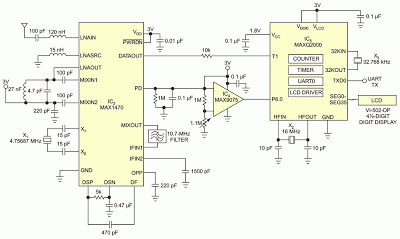
Figure 2. An ASK receiver with a microcontroller processes and displays temperature data.
Comparator IC4 connects to IC3’s RSSI (received-signal-strength indicator) with an internal peak detector. The external RC follows the peak power of the received signal and compares it with a predetermined, resistor-voltage-divider-generated voltage level. Lab experiments show that a threshold of approximately 1.57V generates a valid output on the data-out pin without receiving false readings. Adjust this threshold to the proper level for optimal performance. The comparator’s output is low when the received signal is weak or invalid and high when the received signal is adequate.
Microcontroller IC5 then measures and displays the value of the signal frequency using its integrated timer/counters and LCD-driver peripherals. A counter tracks the number of rising-edge transitions on the input temperature signal, and a timer tracks the elapsed time. After the timer’s 1-sec period elapses, an interrupt occurs. At that moment, the circuit reads the counter value, converts it to Celsius, and displays it on the LCD. The counter then resets to zero to restart the process. The timer automatically reloads once the timer interrupt occurs. UART0 also outputs the resulting temperature. A handheld frequency counter verifies the temperature reading.
The microcontroller monitors the signal power through P6.0, a general-purpose input pin. When the input is logic low, the LCD and UART output “no RF” to alert users of possible transmitter issues when the transmitter and receiver are too far apart from each other. The LCD connection follows the design in the IC’s evaluation kit (Figure 3). Using a look-up table in the data segment of the assembly code enables you to preserve the internal mapping of the display’s A through G segments. This preservation ensures that the display enables the correct segments. Using an RS-232 level converter, the UART output sends data to a data-logging device, such as a computer.
Comparator IC4 connects to IC3’s RSSI (received-signal-strength indicator) with an internal peak detector. The external RC follows the peak power of the received signal and compares it with a predetermined, resistor-voltage-divider-generated voltage level. Lab experiments show that a threshold of approximately 1.57V generates a valid output on the data-out pin without receiving false readings. Adjust this threshold to the proper level for optimal performance. The comparator’s output is low when the received signal is weak or invalid and high when the received signal is adequate.
Microcontroller IC5 then measures and displays the value of the signal frequency using its integrated timer/counters and LCD-driver peripherals. A counter tracks the number of rising-edge transitions on the input temperature signal, and a timer tracks the elapsed time. After the timer’s 1-sec period elapses, an interrupt occurs. At that moment, the circuit reads the counter value, converts it to Celsius, and displays it on the LCD. The counter then resets to zero to restart the process. The timer automatically reloads once the timer interrupt occurs. UART0 also outputs the resulting temperature. A handheld frequency counter verifies the temperature reading.
The microcontroller monitors the signal power through P6.0, a general-purpose input pin. When the input is logic low, the LCD and UART output “no RF” to alert users of possible transmitter issues when the transmitter and receiver are too far apart from each other. The LCD connection follows the design in the IC’s evaluation kit (Figure 3). Using a look-up table in the data segment of the assembly code enables you to preserve the internal mapping of the display’s A through G segments. This preservation ensures that the display enables the correct segments. Using an RS-232 level converter, the UART output sends data to a data-logging device, such as a computer.

Figure 3. Maxim MAXQ2000-KIT Evaluation Kit.
Use the MAX-IDE assembler software to program the device during assembly. The MAXQJTAG board operates with the MAX-IDE to load the code onto the device. You can download the project files here. This design provides for a 1-sec temperature-refresh rate in 1°C increments, which is within the accuracy of IC1.
Downloads
Source Code (MAX-IDE assembler software) - download
MAXQ2000-KIT Evaluation Kit user manual and schematic - download
Subscribe to:
Posts (Atom)